Three months ago my AI agent — Claude Code, the coding assistant I run in a terminal — was editing files directly on the production server, the live machine real users hit, not a safe copy. No branch (a separate line of work that leaves the live code untouched), no CI (continuous integration — the automated checks that fire when you push), nothing at all between “the agent had an idea” and “that idea was live for real people.” If it broke something at 2 AM, the site stayed broken until I woke up and noticed. I’m not proud of it, but that’s where almost everyone starts with coding agents: the default is a very capable intern with root access (full administrator privileges) and no guardrails.
The fix wasn’t to make the agent smarter. It was to make it unable to skip the steps that keep code safe.
Today that same agent runs a strict pipeline — branch, develop, push, CI, PR (a pull request, a reviewable proposal to merge your work into the main code), merge, auto-deploy — and it cannot edit production or skip a step. It runs its own adversarial code reviews (reviews where the reviewer actively tries to break the code) before I even look at the PR. A set of reusable skills I built inside the project orchestrates the whole thing.
This is Part 1 of a series on agentic engineering — the practice of building systems that make AI agents reliable enough to trust with real infrastructure. Not prompt engineering. Not vibe coding (writing code by feel, with no checks). Engineering.
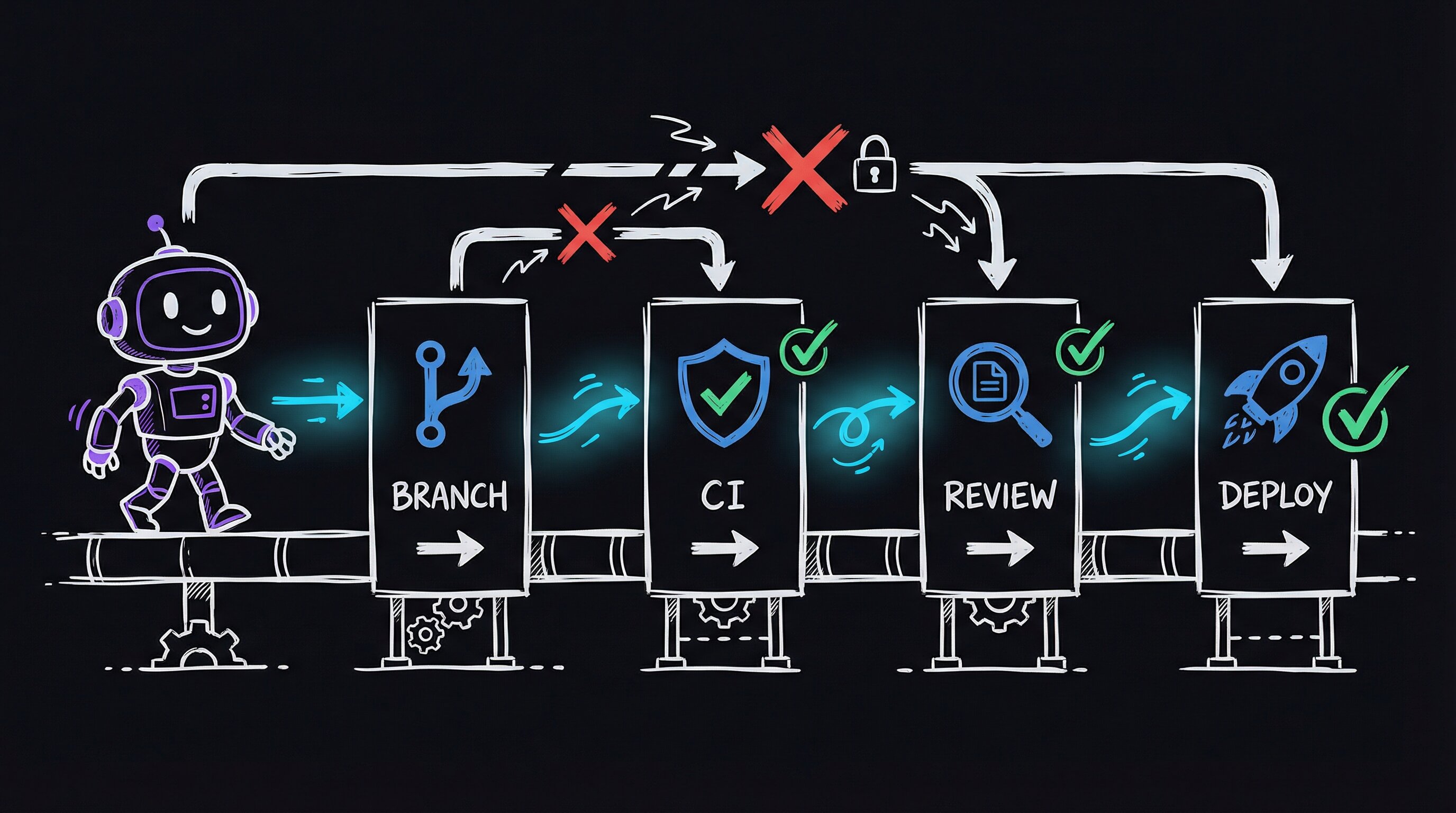
The Problem: Agents Don’t Know When to Stop
Coding agents are remarkably good at writing code. They’re terrible at knowing what happens after. An agent will happily implement a feature, format it, and declare victory while the code sits on whatever branch (or no branch) it happened to land on. The gap between “code written” and “code safely in production” is entirely your problem.
I run a production web application with real users depending on it around the clock. When a bug ships, the service goes down. My first instinct was just to be more careful — watch the agent closer. That’s not a system; it’s a hope. So I needed more than “be careful” — I needed a system.
The Solution: Project-Level Skills as Guardrails
Claude Code has a concept called skills — markdown files (plain-text files with light formatting) that define reusable workflows the agent follows when invoked. They’re not prompts. They’re structured instructions with decision trees, parallel execution steps, and explicit guardrails. Think of them as runbooks — step-by-step procedure docs — the agent reads and executes.
I built nine project-level skills, all prefixed with Portal so I can type /Portal and see them all:
| Skill | What It Does |
|---|---|
/PortalDevFlow | CI/CD stage detector and enforcer |
/PortalBugBot | Adversarial code review that loops until clean |
/PortalCodeReview | Static pattern scan (scanning code for known bad patterns without running it) for anti-patterns |
/PortalArchReview | Deep architectural trace of a single feature |
/PortalE2E | End-to-end test (one that exercises the whole running system) orchestration |
/PortalDeployDelta | Diff devbox (the development machine, a safe copy) vs prodbox (the live server) before deploying |
/PortalCleanupTestData | Reset test data between runs |
/PortalBlogFromVault | Turn recent work into blog posts (meta!) |
/PortalAccess | Role-based portal login for testing |
Each skill has a SKILL.md (routing and triggers), a Workflows/ directory (step-by-step execution), and optionally Tools/ (helper scripts). The agent reads the workflow at invocation time and follows it mechanically.
DevFlow: The Agent Can’t Skip Steps
The skill that changed everything was /PortalDevFlow. When invoked, it runs eight diagnostic commands in parallel — all at once, not one after another — checking the current branch, the working tree status, how far ahead or behind the shared remote copy you are, open PRs, CI status, and the hostname. Then it classifies you into exactly one stage.
the mechanism: how the stage classifier and the adversarial loop actually work
Stage classifier — parallel diagnostics into a deterministic state machine
The SKILL.md for /PortalDevFlow opens with a ## EXECUTE block that fires eight bash commands in parallel (Claude Code supports parallel tool calls natively). The outputs land simultaneously: git branch --show-current, git status --porcelain, git rev-list @{u}..HEAD --count, git rev-list HEAD..@{u} --count, gh pr list --head <branch> --json number,statusCheckRollup, gh run list --branch <branch> --limit 1 --json status,conclusion, hostname, and an environment variable check for a prod-guard sentinel.
The skill then classifies those outputs into exactly one of seven named stages (LOCAL, COMMITTED, PUSHED, CI_RUNNING, CI_PASSED, PR_OPEN, MERGED) and emits the single next-action command. Stage is a pure function of the eight signals — no ambiguity, no “it depends.” You can re-implement this in any CI system:
# .github/workflows/devflow-guard.yml  (simplified illustrative example)
- name: Detect stage
  run: |
    DIRTY=$(git status --porcelain | wc -l)
    AHEAD=$(git rev-list @{u}..HEAD --count 2>/dev/null || echo 0)
    echo "dirty=$DIRTY ahead=$AHEAD"
    if [ "$DIRTY" -gt 0 ]; then echo "STAGE=LOCAL_DIRTY" >> $GITHUB_ENV; fi
BugBot loop — ODC coverage as the convergence criterion
The adversarial loop is not “run until no bugs.” It runs until every bucket in the Orthogonal Defect Classification taxonomy has been actively probed by at least one agent pass with zero findings. ODC gives you seven orthogonal defect types (Algorithm, Assignment, Checking, Timing/Serialization, Interface, Function, Build/Package). The state file (bugbot-state.json) tracks which ODC buckets each completed agent pass covered and what its verdict was. The loop terminates only when: (1) three consecutive passes each find zero critical/high issues, AND (2) all seven ODC buckets are marked covered:true. This makes convergence verifiable rather than a vibes call — if Timing/Serialization has never been probed, the loop keeps going.
Concrete takeaway — build your own parallel diagnostic skill
Any Claude Code skill can fire parallel tool calls in its EXECUTE block. The pattern that makes DevFlow reliable: list every diagnostic command on its own line in the workflow markdown, then write the classification logic as an explicit if/elif chain the agent reads verbatim. The agent doesn’t invent the rules — it reads and applies them. The skill IS the state machine; the agent IS the runtime.
More importantly, it detects deviations. If you’re editing files on master — the main branch, where live code lives — it tells you to stash (temporarily set aside) your changes and create a branch instead. If it detects you’re on the production server, it refuses to proceed. These aren’t suggestions. The agent treats them as hard rules because the skill workflow says so explicitly.
The first time I ran it after building it, it caught me: “DEVIATION: You have uncommitted changes on master.” It then walked me through creating a feature branch, committing, pushing, waiting for CI, creating a PR, merging, and watching the auto-deploy. The full pipeline, enforced by the agent, for the first time.
BugBot: The Agent Reviews Its Own Code
The second breakthrough was /PortalBugBot. It uses a technique called the Ralph Wiggum loop — a self-referential execution loop where the agent gets the same prompt fed back to it on every iteration, but sees its previous work on disk.
Each iteration, BugBot:
- Reads a state file tracking what it’s already found
- Picks 3-5 untried attack angles (race conditions — timing bugs where two processes step on each other; timezone bugs; SQL injection — slipping database commands in through user input; stale state — leftover data that’s gone wrong)
- Spawns parallel review agents, each hunting for specific bug categories
- Fixes any CRITICAL or HIGH findings and writes regression tests — tests that guarantee a fixed bug stays fixed
- Updates the state file
The loop terminates only when a full pass of 3+ agents finds zero critical issues, all seven ODC (Orthogonal Defect Classification) triggers are covered, and all tests pass. It typically runs 3-6 iterations.
In the last run, BugBot found 9 bugs across a marketing analytics feature — things like unescaped SQL parameters, missing null checks on API responses, and a timezone conversion that silently dropped DST offsets (the daylight-saving-time shift). I wouldn’t have caught most of those in manual review.
What Actually Changed
The concrete difference:
| Before | After |
|---|---|
| Edit on prodbox directly | Feature branches with auto-deploy |
| No CI | Lint, format, test, security scan on every push |
| Manual “looks good” review | Adversarial multi-agent review loops |
rsync (a command-line file-copy tool) to deploy | git push triggers GitHub Actions (GitHub’s built-in CI runner) |
| Rollback = “hope you remember what changed” | Automatic rollback on health check failure |
| ”Did I break something?” | Agent detects deviations before they happen |
The agent that broke production at 2 AM is the same agent that now refuses to touch production without going through the pipeline.
The Key Insight
Skills aren’t about making the agent smarter. They’re about making it constrained. An unconstrained agent with GPT-4 or Claude-level capability is dangerous precisely because it can do anything — including the wrong thing, confidently. Skills give the agent a decision tree that routes it toward correct behavior regardless of how creative its reasoning gets.
The pattern is simple: define the workflow as a markdown file, put hard rules in a guardrails section, and let the agent read and execute it mechanically. The agent’s intelligence handles the details; the skill structure handles the process.
What’s Next
This is Part 1. In upcoming posts, I’ll cover:
- Part 2: BugBot in detail — how adversarial loops with confidence scoring catch bugs that unit tests miss
- Part 3: ArchReview — tracing every code path through a feature to find structural problems
- Part 4: The Full Stack — how all nine skills compose into a development lifecycle
The skills are evolving as I use them. Every time the agent does something wrong, I add a guardrail. Every time I do something manually that should be automated, I build a skill. The system gets stricter over time, which is exactly the point.
If you’re using AI coding agents and shipping code without a pipeline like this, you’re where I was three months ago. It works until it doesn’t. The investment in building these skills pays for itself the first time the agent catches a deviation you would have missed at midnight.