BugBot caught it before I did. The lunch-break banner I’d just built rendered perfectly on /flow — the main scheduling screen — and crashed hard on /welcome, the landing page. Both routes share one template, the HTML skeleton that builds the page, and only /flow passed the lunch_break variable — the value the template needs to decide whether to show the banner — down to it. I’d tested the feature on the screen where I built it and never opened the other one. BugBot, my adversarial review tool whose entire job is to attack the code rather than approve it, found the crash, fixed it, wrote a regression test (a test added so this specific bug can’t come back), and kept looping until it had nothing left to find.
That morning was the whole series in miniature:
Don’t make AI agents smarter — make them constrained, adversarial, and self-improving.
A smart agent with no constraints is a liability. I learned that by feeding an agent more context, writing longer prompts, and trying to make it smarter. It became slower, more confident, and just as wrong. The nine skills below take the other approach. They constrain the agent.
The previous three posts covered the pieces: DevFlow for CI/CD enforcement — continuous integration and continuous deployment, the automated pipeline that tests and ships code; BugBot for adversarial review; and ArchReview for architectural tracing. The value is in how they compose: nine skills that together replace what used to be a chaotic, manual, error-prone development process.
This post maps the full lifecycle: how a feature goes from idea to production using nothing but skill invocations, and why the system keeps getting stricter over time.
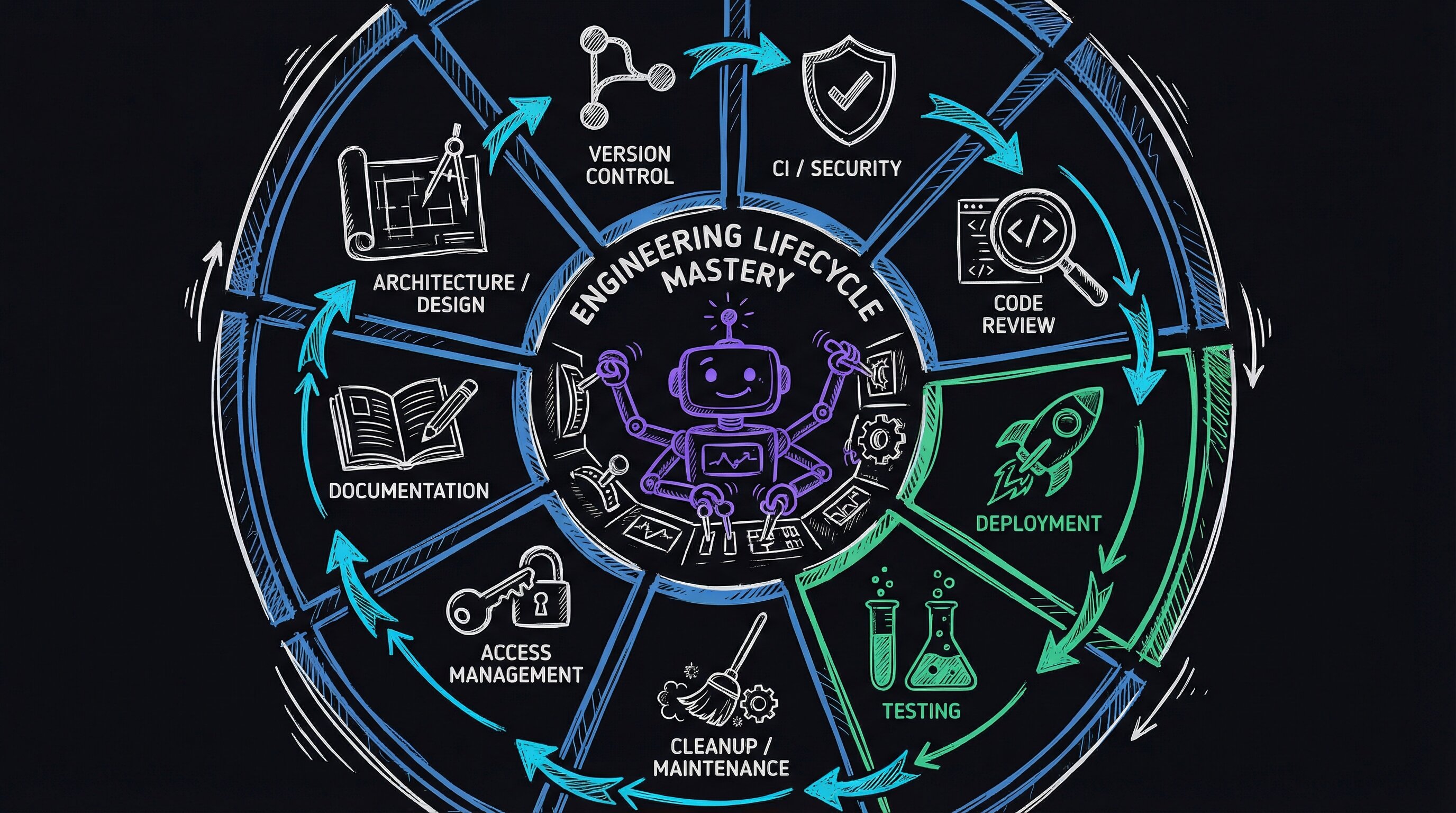
The nine skills
Every skill is prefixed with Portal — I type /Portal and see all of them via autocomplete. A “skill,” in Claude Code, is a self-contained folder the agent loads on demand: a SKILL.md file that tells it when to activate, a Workflows/ directory of numbered execution steps, and optionally a Tools/ directory of helper scripts. Each of the nine plays one role in the lifecycle.
| Skill | Role in Lifecycle | Invocation |
|---|---|---|
| DevFlow | Pipeline enforcer — checks stage, blocks deviations | /PortalDevFlow |
| BugBot | Adversarial review loop — attacks until ALL_CLEAN | /PortalBugBot |
| CodeReview | Broad anti-pattern scan — 12 categories | /PortalCodeReview |
| ArchReview | Deep feature trace — audit + design solution | /PortalArchReview |
| E2E | End-to-end test orchestration — 30+ scenarios | /PortalE2E |
| DeployDelta | Pre-deploy diff — devbox vs prodbox comparison | /PortalDeployDelta |
| CleanupTestData | Reset test state — remove synthetic test records | /PortalCleanupTestData |
| Access | Role-based portal login — front desk, MA, provider, manager | /PortalAccess |
| BlogFromVault | Documentation — turn recent work into blog posts | /PortalBlogFromVault |
One feature through the system
The lunch break scheduling feature followed this sequence:
1. Understand
/PortalArchReview audit the scheduling pipelineBefore writing a line of code, ArchReview traces every code path through the scheduling system. Five parallel agents — separate Claude Code sessions running at the same time, each fixated on one question — map entry points (the functions where a request first enters the code), find duplicated logic, trace data flow, check transaction safety (whether database writes either fully complete or fully roll back, never half-finished), and verify i18n completeness (i18n = internationalization, the work of making every user-facing string translatable). The output tells me exactly which functions I need to modify and which ones I need to be careful not to break.
2. Develop
/PortalDevFlowDevFlow detects I’m on master — the main branch, where production code lives — and tells me to branch, meaning create a separate copy of the code to work in. I create feature/lunch-break, build the feature, and invoke DevFlow again periodically. It tracks my progress: uncommitted changes → committed → pushed → CI running (CI here being the server that runs the test suite on every push).
3. Review
/PortalBugBotBugBot launches the adversarial loop against my changes. This is the moment from the opening — it finds that the lunch break banner works on /flow but crashes /welcome, because both routes render the same template but only one passes the lunch_break variable. BugBot fixes it, writes a regression test, and continues looping until clean.
4. Test
/PortalCleanupTestData
/PortalE2E lunch-break
First, clean up any test data left behind by previous runs — synthetic patients, appointments, and records that would pollute the next test. Then run the end-to-end scenario — 42 unit tests (unit tests check one function in isolation) plus browser automation that walks through admin config, scheduling rules, multi-language UI banners, display screens, and time calculations.
5. Deploy
/PortalDevFlowDevFlow sees CI passed and no pull request exists yet. A pull request, or PR, is the proposed change you open for review before merging it into the main branch. DevFlow tells me to create one. After merge — folding the branch’s changes back into the main line — it confirms the auto-deploy triggered (the system that pushes merged code to production automatically). If I want extra confidence, I run DeployDelta first:
/PortalDeployDeltaThis SSHes into prodbox — our production server, reached over SSH, a secure remote-shell connection — in read-only mode, and produces a diff (a line-by-line comparison showing what differs) across git state, environment variables (config values like passwords and feature flags stored outside the code), nginx config (nginx being the web server sitting in front of the app), database migrations (the scripts that evolve the database schema over time), dependencies (third-party libraries the app relies on), and JS bundles (the packaged JavaScript files the browser downloads) against what’s on the branch. The output is a concrete checklist of what will change.
6. Document
/PortalBlogFromVaultIt analyzes the git commits — the saved snapshots of changes — reads the source code, and generates a blog post about the work. The post you’re reading right now was generated this way.
What a skill contains
Every skill follows the same structure:
the mechanism: why structured workflows beat smart prompts
The skill anatomy above looks simple — markdown files and a YAML header. The power is in the contract it enforces at invocation time.
Routing via USE WHEN triggers. Claude Code loads SKILL.md into context when it matches the description field. The agent then reads the Workflows/ markdown and executes it step by step, treating numbered instructions like a deterministic state machine rather than free-form guidance. “Structure handles process; intelligence handles details” is the actual division of labor — not a metaphor.
The adversarial loop (BugBot’s inner loop). BugBot works by maintaining a catalog of attack angles (28 for Portal, stored as plain markdown). Each loop iteration spawns a focused sub-task per angle — think: Bash("grep -rn 'datetime.now()' src/") to find timezone violations, then a second pass to count unique callers of every changed function. The loop exits only when all 28 angles return no findings. This is mechanically enforced inside the workflow file itself with an explicit STOP condition line.
E2E browser automation. Test scenarios are markdown specs consumed by agent-browser (a Playwright-backed headless runner). The agent reads the spec’s Actions: block and drives the browser imperatively — no Selenium selectors hard-coded in Python, no fragile CSS paths checked in. The spec IS the test.
Want to see the pattern? Create a minimal skill directory and drop this into SKILL.md:
---
name: MySkill
description: |
  Runs a focused audit.
  USE WHEN user says "audit", "check", "/myskill"
---
Then write Workflows/Audit.md with numbered steps and a STOP condition: line. Invoke it and watch the agent follow the steps mechanically, only stopping when your condition is met. That’s the whole engine.
How failures become rules
Every bug that ships teaches the system something:
| Bug Shipped | Skill Updated | Rule Added |
|---|---|---|
| Visit-reason note missing from 4 of 5 callers | ArchReview | ”Count ALL callers before fixing a missing side effect” |
| Phone numbers compared in different formats | BugBot | Attack angle: “Round-trip consistency across normalization boundaries” |
| Template variable missing on sibling route | ArchReview | ”Compare render_template kwargs across ALL callers” |
Bare commit() causing database locks under load | CodeReview + ArchReview | Transaction safety audit agent |
datetime.now() instead of utc_now_iso() | CodeReview | Timezone/date anti-pattern scanner |
Lunch break banner crash on /welcome | BugBot + E2E | Template variable completeness + 42-test E2E scenario |
The skills are a living codebase of operational knowledge. Each lesson becomes a rule, attack angle, or test scenario. The system gets stricter because each constraint came from a real bug that shipped. As the skill set grows, this series will continue with it. Every new feature, every new class of bug, and every new deployment pattern becomes a new skill or a new rule in an existing one. The system gets stricter. The code gets more reliable.
A constrained agent that follows structured workflows, attacks its own output, and encodes every failure as a new rule is an engineering system. The skills are the system. The agent is just the execution engine.
E2E: 30+ scenarios and growing
The E2E skill has over 30 test scenarios covering the full user journey:
| Category | Scenarios |
|---|---|
| Self-service | Registration, batch check-in, demographics edge cases, record matching, session isolation |
| Booking | Online booking, booking page UI, Stripe payment integration |
| Workflows | Queue management, form fill forward, document processing, signature workflow |
| Infrastructure | Multi-tenant security (104 curl tests), SMS/SSE scalability (17 checks), video call integration |
| Video | Virtual visit workflow, post-visit survey |
Each scenario has a markdown spec with preconditions, step-by-step actions, expected results, and cleanup instructions. The agent reads the spec and executes it with browser automation (agent-browser — a tool that drives a real browser with no human clicking), API calls (curl, the command-line tool for making raw HTTP requests), and database queries. No manual clicking through UIs.
What it costs
Building nine skills took weeks of iteration. Each started simple and grew as bugs supplied new lessons. The BugBot workflow alone is 462 lines of markdown with a 28-angle attack catalog.
I do not know where the ceiling is — whether routing gets noisy at thirty skills or the attack catalog grows faster than I can reason about. The return so far is compounding. Every new feature I build benefits from every lesson every previous feature taught. The lunch break feature had fewer bugs than the alternate phones feature, which had fewer than the feature before that. The skills accumulate knowledge faster than I accumulate technical debt — the mounting cost of shortcuts and fixes piling up. I sleep better when the agent is shipping code at 2 AM.