
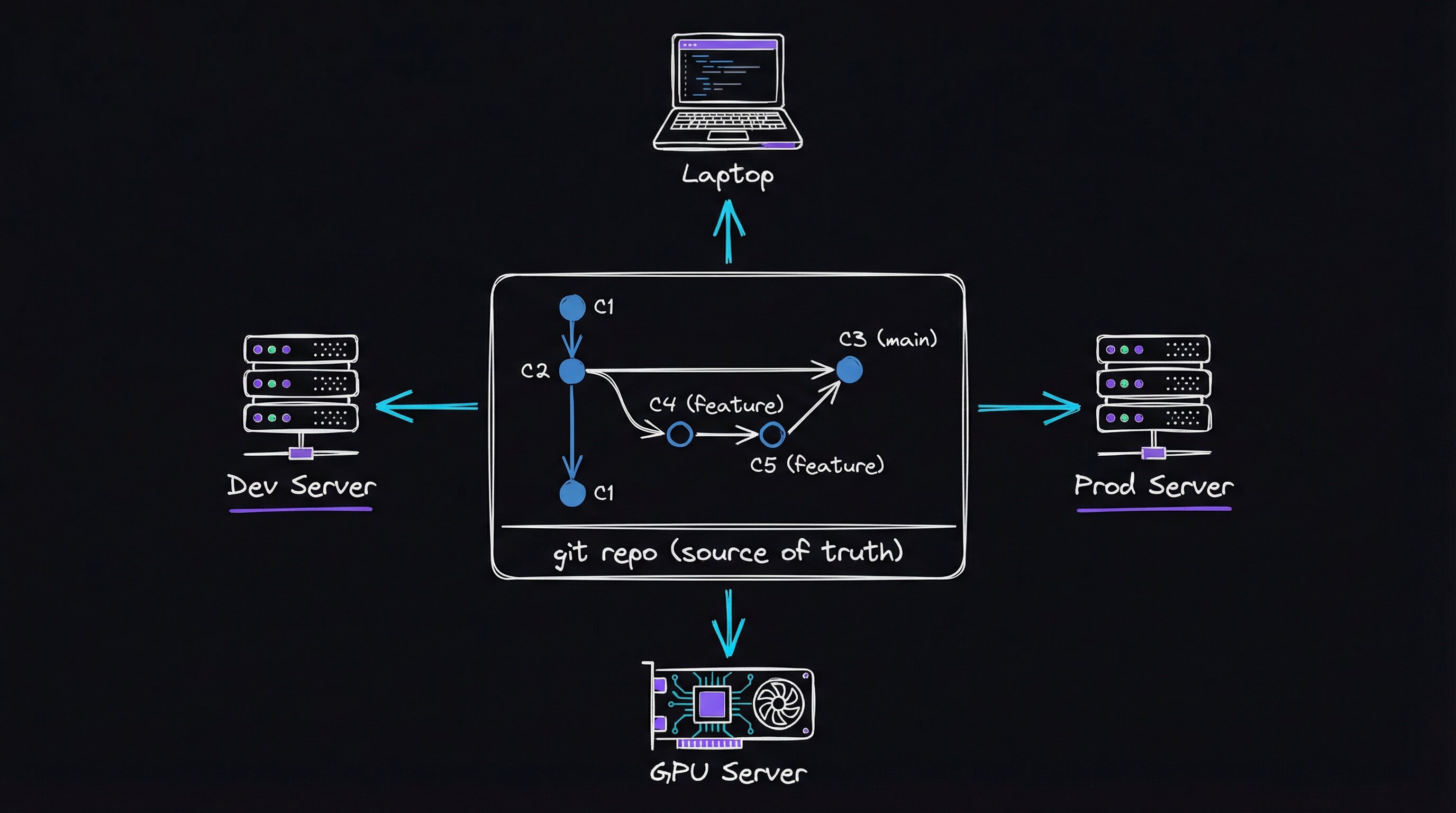
I had four machines. My AI assistant behaved differently on each one.
The dev server was running skills I’d updated three weeks ago and never pushed anywhere else. The production server had a custom hook I’d added in a late-night debugging session and completely forgotten about. The GPU workstation had a global config that was months behind. My laptop — the machine I actually developed on — had the latest everything. But “latest” only meant something on one machine.
I wasn’t managing my AI config. I was accumulating it.
The Problem with Editing Files Directly
Claude Code — Anthropic’s AI coding agent — stores all of its personalization in ~/.claude: a global instructions file, skills, hooks (event-driven automation that fires on session start, tool use, etc.), subagent definitions, and slash commands. It’s a directory, not a service. So the default workflow is: edit it directly on whatever machine you’re on.
For one machine, that’s fine. At two machines, I had drift — the same ~/.claude directory diverging in slightly different directions on each box. At four, I had chaos. Every time I improved something — a new skill, a better hook, a clarified instruction — I had to manually propagate it. I usually didn’t.
Sound familiar? It’s the same problem as editing nginx config directly on a production server. The fix is the same, too.
Treat ~/.claude Like Infrastructure
I created a git repository — claude-config — that contains everything that should live in ~/.claude.
the mechanism — rsync, self-hosted runners, and the deploy target pattern give me the detail
Directory layout
claude-config/
├── CLAUDE.md          # Global instructions (modes, rules, machine topology)
├── deploy.sh          # Sync to any/all machines
├── skills/            # ~43 skills: DevFlow, BugBot, BlogWriter, Research...
├── hooks/             # Event-driven automation
├── agents/            # Subagent definitions
└── commands/          # Slash commands
Why rsync instead of git clone on each machine
The target directory (~/.claude) already contains runtime state that must never be overwritten — session history, credentials, local settings. git clone would either conflict or clobber. rsync --delete with a precisely crafted --exclude list gives surgical control: only the tracked artifacts land, and nothing else is touched.
rsync -av --delete \
  --exclude='.credentials.json' \
  --exclude='settings.json' \
  --exclude='settings.local.json' \
  --exclude='history.jsonl' \
  --exclude='statsig/' \
  ./  ~/.claude/
Run this locally and diff -r ~/.claude/skills/ ./skills/ confirms parity. The same command runs inside every self-hosted GitHub Actions runner, triggered on push to main.
Self-hosted runners are the multiplier. Each remote machine runs one long-lived runner process (./run.sh from the Actions runner tarball, registered against the repo). On a push, GitHub dispatches the job; the runner on that machine pulls the updated repo and re-runs deploy.sh local. No SSH from CI, no secrets management for target hosts — the machine pulls to itself.
Testable takeaway: register a second machine as a runner, push a one-word change to CLAUDE.md, and watch both ~/.claude/CLAUDE.md files become identical within the CI run time (~45 seconds). That’s the whole trick.
The deploy.sh script uses rsync to push everything into ~/.claude on whatever target you specify:
./deploy.sh local      # Apply to this machine's ~/.claude
./deploy.sh all        # Push to all machines at once
Remote machines run self-hosted GitHub Actions runners — small persistent processes that wait for GitHub to tell them “new push, go deploy.” When I push to main, CI runs three checks (secret scanning, shell script linting, skill structure validation), then each remote machine’s runner deploys to its own ~/.claude. The whole process takes under a minute.
What Goes In, What Stays Out
Not everything belongs in the repo:
| Tracked in Repo | Stays Local |
|---|---|
CLAUDE.md (global instructions) | settings.json (API keys) |
| All skills and hooks | settings.local.json |
| Agents and commands | history.jsonl / session data |
| PAI user overrides | Cache, telemetry |
Secrets stay local. Everything that shapes the assistant’s behavior — instructions, workflows, automation — is version-controlled.
The Development Workflow
Updating a skill or changing an instruction is now a proper pull request:
git checkout -b fix/update-skill-angles
# ... edit skills/BugBot/Workflows/AdversarialReview.md ...
git add -A && git commit -m "fix: add data pipeline attack angle"
git push   # CI runs checks, then deploys to all remote machines
./deploy.sh local   # Apply to laptop (no persistent runner there)
Before this repo existed, I was directly editing ~/.claude/skills/ on whichever machine I happened to be sitting at. Now that directory is a deploy target — never edited directly. The source of truth is always the repo.
One wrong turn worth mentioning: I initially tried symlinking ~/.claude to a git checkout. That broke spectacularly — Claude Code writes runtime state back into the same directory, so the repo constantly showed dirty files, and the symlink itself confused some tooling. The rsync approach separates the source tree from the live directory cleanly. Only tracked files move; runtime state stays put.
Results
- Four machines, one config. Any change I make is everywhere within two minutes of a push.
- Instant rollbacks. If a skill change breaks something,
git revertand push. Total downtime: one CI run. - Audit trail. Every change to how my assistant behaves is in the git log with a commit message explaining why.
- Review gate. PRs give me a checkpoint before config changes go live. CodeRabbit reviews every PR automatically.
What I Learned
Config drift is quiet. When your AI assistant behaves differently on different machines, you don’t usually notice immediately. You notice later — when you’re trying to reproduce a workflow, or when something works on the dev server but not on your laptop, and you spend twenty minutes debugging a “bug” that’s actually just a stale config.
The deploy target pattern generalizes. Don’t edit ~/.claude directly, ever — just like you don’t edit a config file directly on a production server. Have a source, have a deploy step, have a record.
Hooks and agents need version control too. It’s tempting to think only the “instructions” matter. But hooks and agent definitions shape behavior just as much as the instructions file. They all go in the repo. I forgot a hook I’d written at 2 AM and only rediscovered it when I finally ls’d the directory during this cleanup. If it hadn’t been on the machine I was auditing, it would’ve stayed lost.
Tools used: Claude Code by Anthropic, GitHub Actions for CI/CD, CodeRabbit for automated PR review. Source: RooseveltAdvisors/claude-agent-stack.