Last month I was debugging a Claude Code agent session that had gone haywire in a tmux split. The agent’s output was bleeding escape codes into the wrong pane — cursor jumping to column 47 when it should’ve been at 0, color state leaking between splits, rendering that made no sense. I’d seen glitches like this for years and never questioned them. Terminal multiplexers just do that sometimes.
Then I read Kovid Goyal’s argument that tmux and screen aren’t buggy — they’re architecturally broken. It reorganized how I think about my entire terminal workflow.
Goyal created Kitty, a terminal emulator — the program that draws the text, colors, and cursor on screen. His claim is that terminal multiplexers (tools like tmux that split one terminal window into multiple sessions, each running its own shell or program) are “completely an anti-pattern” for local development. The code can be good and the design can still guarantee problems that no implementation can remove.
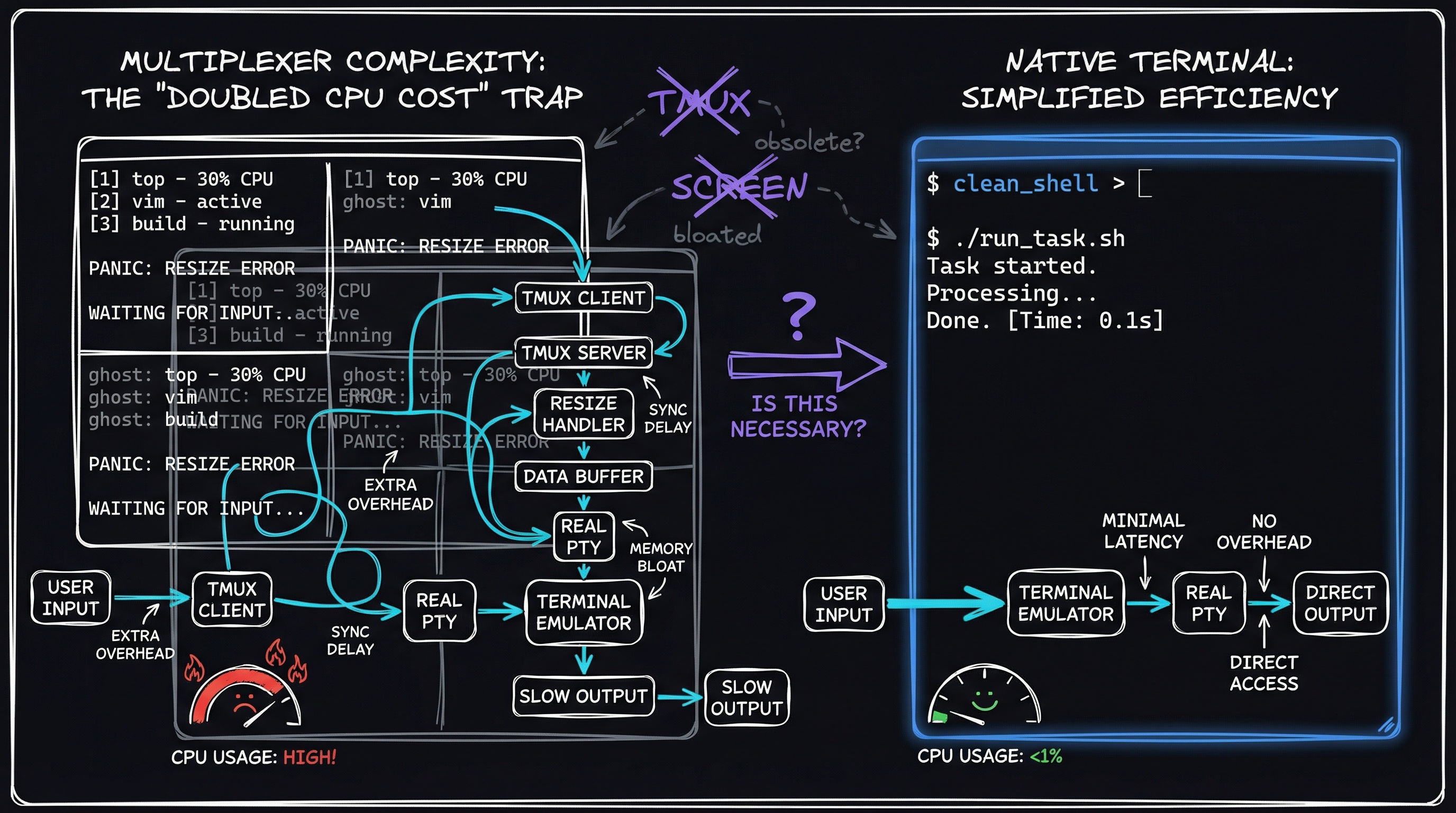
Three problems the design creates
1. Every byte hits two parsers
A terminal multiplexer runs a terminal emulator inside your terminal emulator. When a program writes output, the multiplexer reads every byte, interprets it through its own emulator, updates its screen model, and then encodes the output again for the real terminal. The same stream goes through two full parsers.
Normal output hides the cost. For high-throughput work — streaming logs, large diffs, and build output — the parser overhead is measurable. No tmux optimization can remove the second parser because it is part of the architecture.
2. Features die at the middleman
For a new terminal feature to reach you, both the terminal and the multiplexer must support it. The multiplexer becomes a gatekeeper whether you wanted one or not.
Kitty has a graphics protocol that renders images inline in the terminal. If you run tmux inside Kitty, you cannot use it — not because Kitty lacks support, but because tmux does not. Goyal tried to coordinate with the tmux maintainer to add support. It did not happen. For tmux users, the feature does not exist, regardless of what the terminal can do.
3. Two enormous state machines that have to stay synchronized
A terminal emulator tracks a massive amount of internal state: text color, bold/italic/underline, cursor position and mode, and hundreds of “escape codes” — the \x1b[... sequences that control everything from cursor movement to background color. It is a state machine: a program whose behavior depends on accumulated internal state that changes with every input sequence.
A multiplexer runs its own state machine while translating between its model and the host terminal’s model. Two slightly different, enormously complex state machines are bridged in real time.
The simplest case: a carriage return (\r) normally moves the cursor to column 0 of the current line. In a 120-column terminal with a tmux split, the right pane starts at column 61. Tmux has to intercept the raw \r and emit an absolute cursor-position command that lands at 61, not 0. And carriage return is literally the easiest cursor movement there is.
Search any sophisticated terminal program’s bug tracker for “tmux” and you find bugs that reproduce only inside multiplexers. That is the architecture showing through.
This is a software pattern that shows up everywhere: a solution that was elegant in one era becomes legacy drag in the next, and nobody notices because everyone assumes infrastructure this widely used must be correctly architected.
Put the terminal back in charge
Goyal’s alternative flips the responsibilities:
- The terminal does window management, splitting, and display — its actual job.
- The multiplexer does exactly one thing: session persistence. Keep your programs alive when the connection drops.
Each window gets its own dedicated TTY — the kernel device that pipes data between programs and terminals. There is no state bridge and no double parsing. New terminal features work immediately because there is no middleman that also needs to support them. Tmux solved real problems when terminals were dumb display devices that could not manage multiple sessions. Modern terminals can do that work natively, but we kept running the middleman out of habit.
The catch is that the terminal has to support the features. This is not universal like tmux. But if you’ve already committed to a specific terminal, the native approach is strictly better. WezTerm ships this architecture. Kitty exposes the primitives for building your own workflow.
Kitty’s building-block approach
Instead of a monolithic multiplexer, Kitty provides composable primitives:
the mechanism — and a script you can actually run
Why the double-interpretation cost is real. Every terminal sits on a pseudo-terminal pair (/dev/pts/*): the master fd your shell writes to, and the slave fd the kernel presents to the running program. When you add tmux, it inserts a second pty pair: tmux owns the master of your app’s pty, interprets every byte (updating its internal VT state machine), then re-encodes the output and writes it into the pty that your actual terminal reads. Two full DFA-style parsers — VT100/VT220/xterm-256color state machines — where one would do. Libraries like libvterm and vte make the scope of this parser visible: each implements hundreds of escape sequences and dozens of parser states just for one side of the bridge.
The carriage-return rewrite, concretely. \r (0x0D) is “move cursor to column 0 of the current line.” Inside a 120-column terminal running a tmux split, the right pane starts at column 61. tmux must intercept the raw \r and emit \x1b[<row>;<col>H (CUP — cursor position absolute) to land the cursor at column 61 instead. Every cursor-movement code has a similar story.
Try it yourself — scriptable session switching without tmux. Kitty exposes its state over a Unix socket via kitten @. This script opens a named “project” tab or creates one if it doesn’t exist, without a multiplexer in the middle:
#!/usr/bin/env bash
# Usage: switch-project.sh <project-name>
PROJECT="${1:?need a project name}"

# Find a tab whose title matches; kitten @ ls returns JSON
MATCH=$(kitten @ ls --self 2>/dev/null \
  | jq -r ".[] | .tabs[] | select(.title == \"$PROJECT\") | .id")

if [[ -n "$MATCH" ]]; then
  kitten @ focus-tab --match "id:$MATCH"
else
  kitten @ new-tab --tab-title "$PROJECT"
  kitten @ send-text --match "title:$PROJECT" "cd ~/$PROJECT && clear\r"
fi
No second pty. No state-machine bridge. New terminal features (Kitty’s graphics protocol, Unicode text sizing, hyperlinks) work immediately in every tab.
The idea is to provide building blocks and let users compose their workflows instead of shipping one complete, rigid system. It takes more work up front than tmux’s “install and go,” but it gives users exactly what they need — no more, no less.
Where tmux still belongs
Goyal is direct: traditional multiplexers are still the right answer for remote persistence over flaky connections. When I SSH into a server and the connection can drop, the running process needs to survive that disconnection. A server-side process has to own the TTY independently of SSH. tmux and screen do exactly that.
For local development, his answer is “completely an anti-pattern.” Everything you do locally with tmux can be done natively. The question is not “is tmux bad?” It is whether inserting a second terminal emulator between my program and my screen still makes sense when terminals can manage windows themselves. For remote persistence, yes. For everything else, I was paying an architectural tax for features my terminal already provided.
Kitty’s remote control is not limited to one local process. It works cross-process on the same box, cross-machine over TCP, and is fully scriptable. That supports multi-machine workflows without putting a multiplexer in the middle.
What changed on my machines
I didn’t throw tmux away. I narrowed it:
- Local dev: Terminal-native splits and tabs. Kitty handles layout. Shell scripts handle session switching.
- Remote servers: tmux stays. Session persistence over SSH is its one irreplaceable job.
- Custom scripts: Built lightweight shell wrappers for the session-switching behavior I actually used — not the 80% of tmux features I never touched.
The result is fewer “why does this only break in tmux?” bugs, faster terminal output, and a workflow that matches what I actually do instead of conforming to tmux’s opinions about how I should work.