On Thursday morning, October 29, 2026, at 08:24 EDT, my fleet monitor reported worker node mac-mini-02 offline. The machine is an M2 Mac mini running continuous coding tasks in my basement rack. Every sixty seconds, my coordinator sends a health probe over SSH, the secure shell protocol used to run commands on remote servers. At 08:24 EDT, the probe stopped answering.
My fleet orchestrator paused the queue. When an agent machine goes dark mid-task, the scheduler cannot tell whether the job crashed or the hardware lost power. Just like when a weekly limit is not an hourly rate limit, an unhandled state freeze blocks the whole pipeline.
I spent the next eight hours troubleshooting power management.
The machine was wide awake the entire time.
The trap of the plausible theory
I had a plausible theory ready before I looked at any log.
Two weeks earlier, an automated macOS update had bounced a different node in the cluster. After the reboot, that machine reverted its energy saver preferences and went to sleep after ten minutes of idle time. I had fixed it by updating power assertions. Because that failure was fresh in my memory, I assumed mac-mini-02 had suffered the exact same fate.
I started firing remote wake commands. I sent wake-on-LAN magic packets across the subnet, the local network neighborhood where my machines live. Nothing happened.
Next, I checked the smart plug telemetry. The plug showed a steady draw of 6 watts. On an Apple Silicon Mac mini, 6 watts is an ambiguous number. A sleeping Mac draws under 1 watt. A Mac mini idling at an empty desktop draws about 5 to 7 watts. A busy worker under full compile load pulls 25 to 35 watts. Six watts meant the computer had power, but it could easily be a machine stuck in a half-wake state.
I toggled the smart plug power. I waited two minutes for the boot chime. I fired another SSH probe.
Still nothing.
What was actually happening
At 16:30 EDT, after eight hours of remote poking, I walked down to the basement rack. I plugged an HDMI cable into the back of mac-mini-02 and connected a portable monitor.
The screen lit up instantly. There was no login prompt delay and no wake animation. Terminal windows were open. The CPU usage graph hovered at 3 percent.
The computer had never gone to sleep.
I opened Terminal and checked the network interfaces:
$ ipconfig getifaddr en0
$ ipconfig getifaddr en1
192.168.20.108
Ethernet port en0 was disconnected because the patch cable latch had snapped loose inside the keystone jack earlier that morning. When the wired link dropped, macOS did what every consumer operating system is designed to do. It failed over to Wi-Fi.
The Wi-Fi interface had connected to my guest network on 192.168.20.0/24. The agent cluster lives on the lab network on 192.168.10.0/24. The guest network is isolated by firewall rules. It has its own private subnet, its own DHCP lease pool, and zero routing access back to the lab servers.
My coordinator box was still trying to reach 192.168.10.45, the IP address registered in local DNS. That address was an empty void.
The kernel already told me
Here is the painful part. The operating system told me the exact cause at 08:24 EDT.
When the coordinator tried to open an SSH connection, the shell printed this line:
ssh: connect to host 192.168.10.45 port 22: No route to hostI saw that line and translated it in my head to “the computer is dead.”
That was a sloppy translation. Socket errors are precise. The kernel error class is not a generic complaint. It is a specific diagnostic verdict.
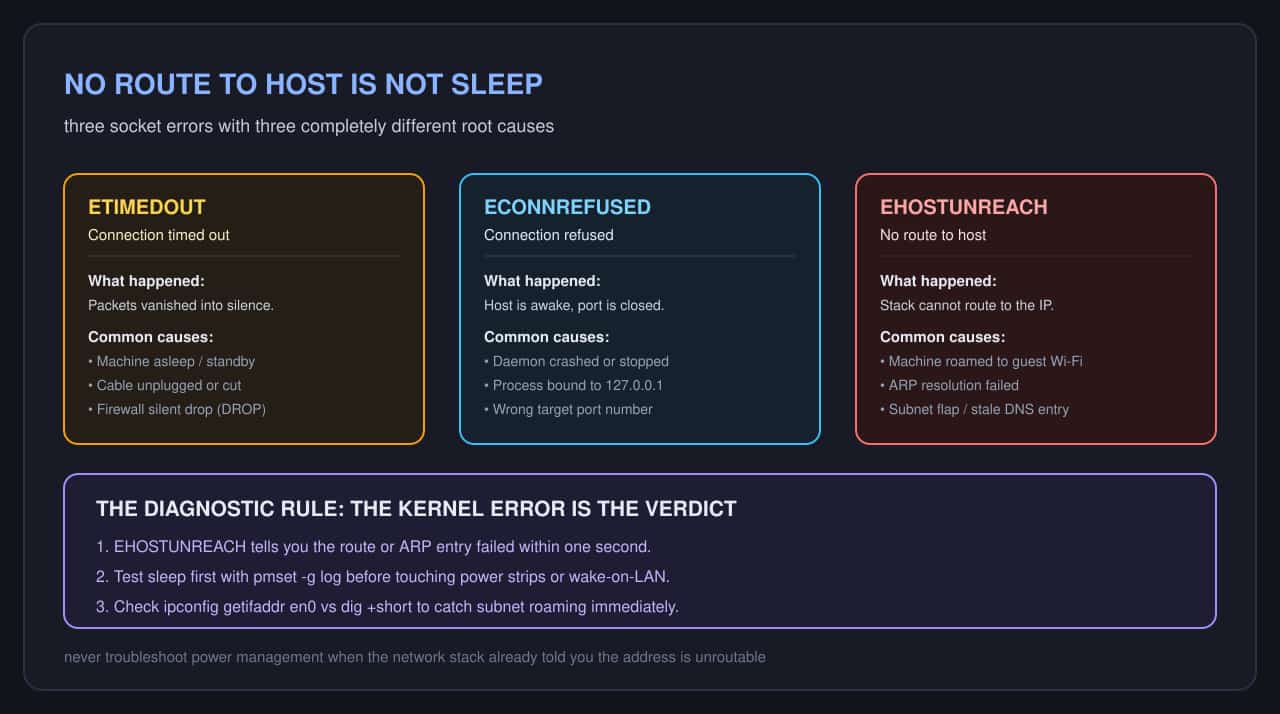
There are three common ways a TCP connection fails, and each points to a completely different failure domain:
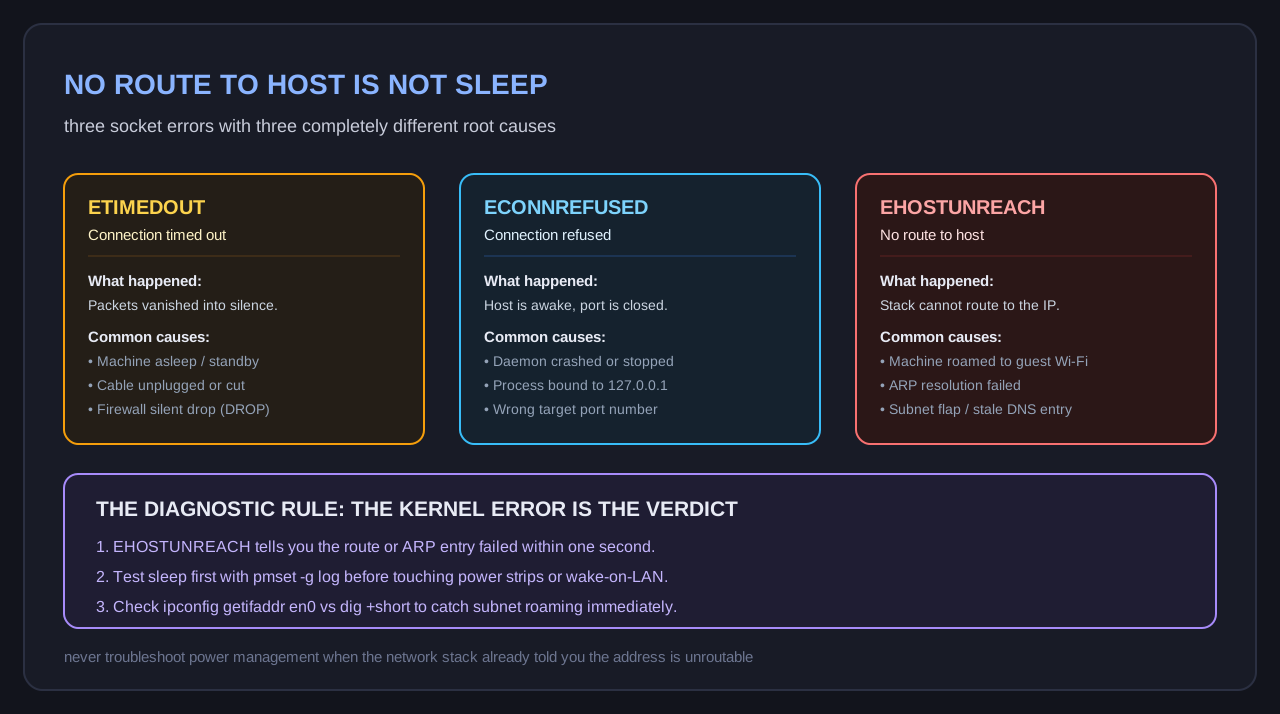
Connection timed out(ETIMEDOUT): Packets left the interface, but no response ever returned. The operating system retransmitted the SYN packet multiple times until giving up. This is what happens when a machine is asleep, turned off, or unplugged from the network entirely.Connection refused(ECONNREFUSED): Packets reached the destination IP, and the target computer replied immediately with a TCP reset packet. The machine is awake and healthy, but no program is listening on port 22. This is what happens when a daemon crashes.No route to host(EHOSTUNREACH): The local network stack or an intermediate router cannot forward the packet. On a local subnet, this means the ARP lookup failed. The coordinator asked “who has 192.168.10.45?” and the switch answered with dead silence.
If mac-mini-02 had been asleep, the probe would have timed out with ETIMEDOUT. The kernel did not give me ETIMEDOUT. It gave me EHOSTUNREACH in less than one second.
The network stack knew the route was gone before I spent my day chasing power bugs.
Two commands that kill the wrong theory
If I had followed an evidence-based checklist instead of my own intuition, the diagnosis would have taken thirty seconds.
First, to verify whether a Mac has slept, check the power management log directly:
$ pmset -g log | grep -i -E "sleep|wake" | tail -n 20This command dumps kernel sleep and wake transitions from the system event database. If the machine never entered sleep mode, the log shows zero sleep transitions. You do not need to guess based on wattage numbers or blinking LEDs.
Second, compare the target IP against the local resolver:
$ dig +short mac-mini-02.local @192.168.10.1
192.168.10.45
$ arp -n 192.168.10.45
192.168.10.45 (incomplete) -- en0
When ARP reports (incomplete), the IP address has disappeared from the physical wire.
Stopping the leak
To prevent this from biting the fleet again, I made three changes across my dedicated machines.
First, I removed every non-production Wi-Fi network from the preferred network list on all worker nodes:
$ sudo networksetup -removepreferredwirelessnetwork en1 "Guest-IoT"Second, I turned off Wi-Fi auto-join entirely on machines that have a physical Ethernet drop. If the Ethernet cable unseats, the node should fail visibly and stay offline rather than silently jumping to a guest sandbox.
Third, I updated my monitoring agent. Previously, any probe failure recorded a generic node offline state. Now the probe parses the exact socket return code. If the check returns EHOSTUNREACH, the alert flags an ARP and subnet routing issue. If the check returns ETIMEDOUT, it triggers power and sleep diagnostics.
When running autonomous agents on macOS, background daemons have plenty of subtle failure modes. I had to learn that when I moved them from LaunchAgent to LaunchDaemon to survive local network privacy rules, and again when standardizing on one runner per box.
Operating systems do not invent error codes at random. When the kernel says there is no route to the host, believe it. It is not sleeping.