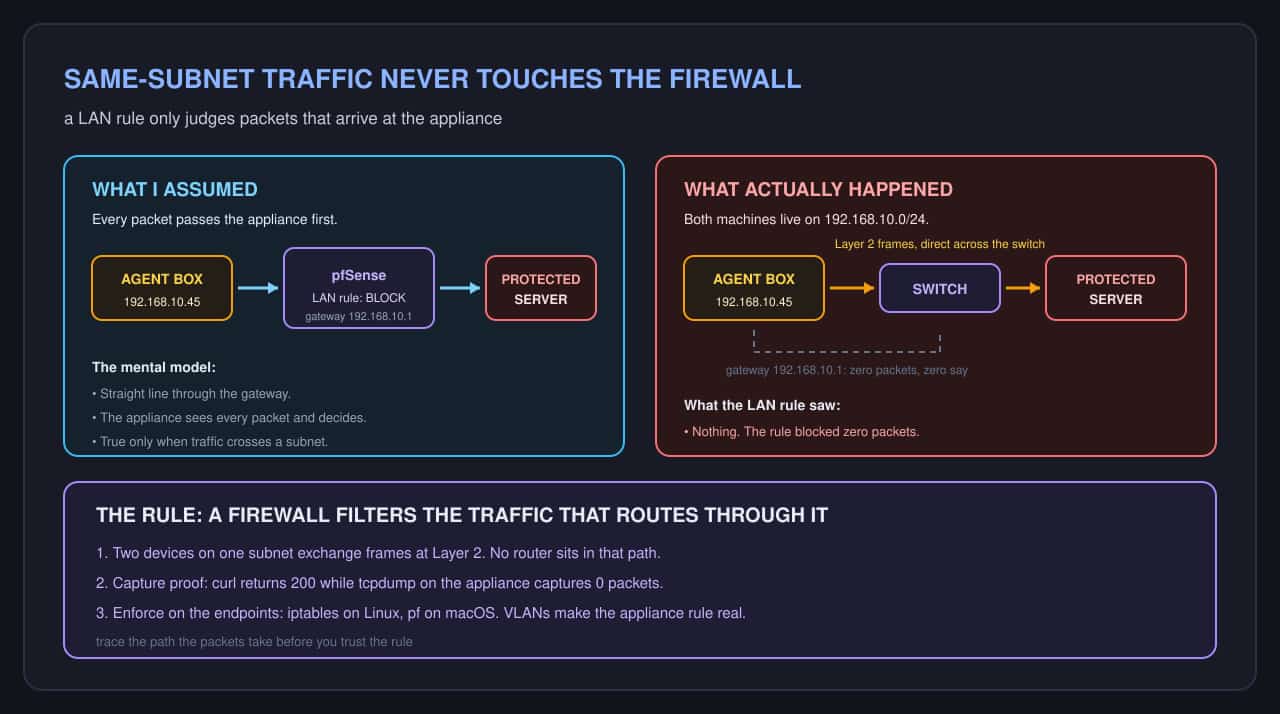
I wanted my agent machines cut off from the protected servers on the lab network. pfSense is the router and firewall appliance that guards that network. It sits at 192.168.10.1, the gateway every lab machine uses.
I opened the firewall rules and added a LAN rule. Source: the agent machine range. Destination: the protected server range. Action: block. I applied the rule.
Then I tested it. From an agent machine I opened a connection to a protected host. The server answered in 40 milliseconds. The rule had blocked nothing.
The path I assumed
My mental picture was a straight line:
agent machine -> pfSense (LAN rule) -> protected serverEvery packet would pass through the appliance, and the appliance would make the call. That is how filtering works when the firewall sits in the path.
Why the rule never fired
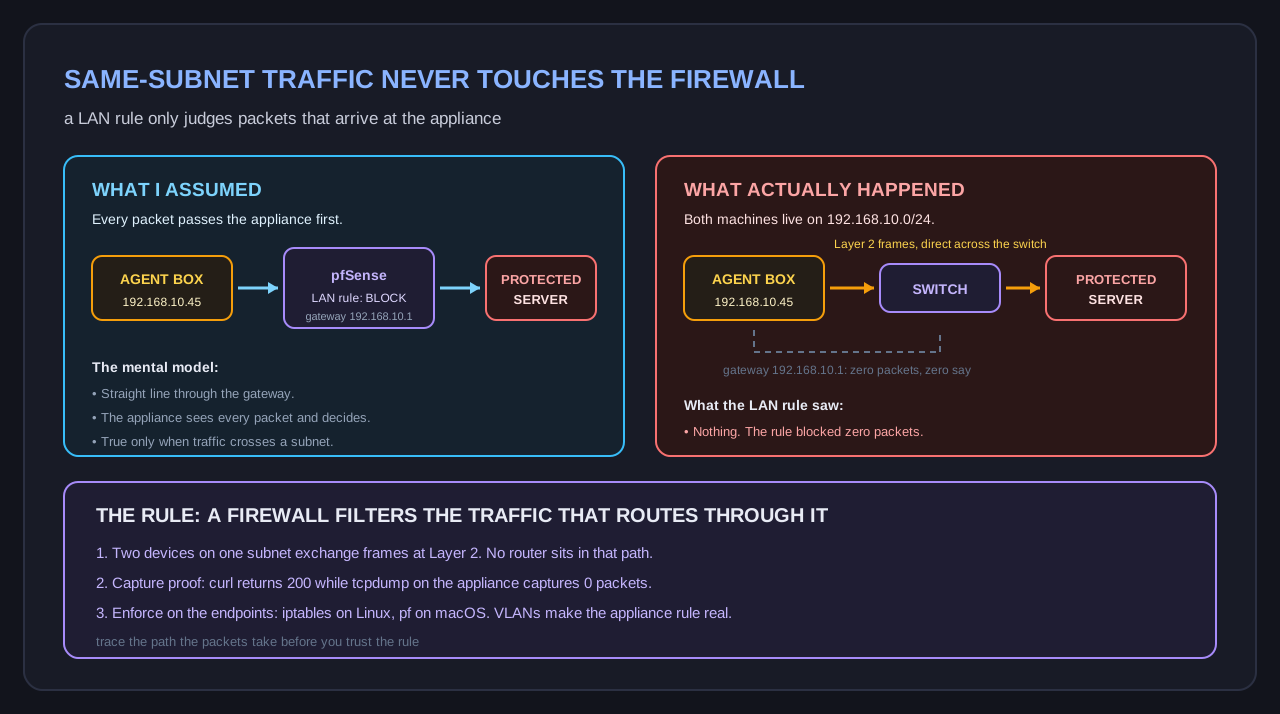
pfSense LAN rules only filter traffic that routes through pfSense. The lab runs on one flat subnet: 192.168.10.0/24. My agent machines and my protected servers sit on that same subnet.
Two devices on one subnet talk directly at Layer 2. Layer 2 is the switch level, where frames carry hardware addresses instead of IP addresses. The sender runs an ARP lookup (Address Resolution Protocol, which maps an IP address to a hardware address), the switch learns where the frame has to go, and it delivers the frame straight across. No router is involved. The gateway at 192.168.10.1 never sees a byte.
A LAN rule can only judge traffic that arrives at the firewall. On a flat subnet, that traffic never arrives.
The contrast is traffic that crosses a subnet boundary. Yesterday an agent machine landed on the guest network and the kernel reported no route to host. Traffic between 192.168.10.0/24 and 192.168.20.0/24 has to be routed, and routed traffic passes through the appliance where the rules live. Same-subnet traffic skips that trip entirely.
The check that proves it
Two commands settle this in under a minute.
First, hit the protected host from an agent machine:
$ curl -m 3 -s -o /dev/null -w '%{http_code} in %{time_total}s\n' http://192.168.10.10:8443/health
200 in 0.041s
Then watch the firewall for the same connection:
$ ssh [email protected] 'timeout 10 tcpdump -ni em0 host 192.168.10.10 and port 8443'
tcpdump: listening on em0, link-type EN10MB (Ethernet), capture size 262144 bytes
0 packets captured
The connection returned 200 while the firewall captured zero packets. Both facts fit together. The packets never traveled the path the rule guards.
Fixing it where the traffic actually is
The enforcement point has to move to the endpoints. A switch delivers frames between two machines on one subnet, so only the sending and receiving machines can filter them.
On a Linux agent box:
$ sudo iptables -A OUTPUT -d 192.168.10.10/32 -j DROPOn a macOS agent box, pf is the host firewall:
$ echo "block drop out proto tcp from any to 192.168.10.10 port 8443" | sudo pfctl -ef -I kept the pfSense rule in place. It starts doing real work the moment I split the lab into VLANs (virtual local area networks, which carve one subnet into smaller subnets that the appliance does route). Until then it is a promise the topology does not keep. Host firewalls are the primary control now, and the appliance rule is defense in depth.
The lesson
A firewall filters the traffic that routes through it. Before you trust a rule, trace the path the packets actually take. On a flat subnet the switch does the delivery, the appliance is a bystander, and your LAN rule is documentation.